Chapter-focused Markdown editor for long-form writers on Android
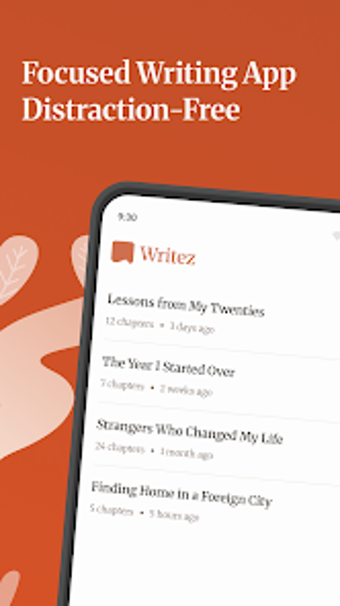
Writing App Markdown Editor, developed by Eco Mobile for Work, targets long-form writers and students managing multi-chapter projects. It supplies a distraction-moderated writing space with Markdown plus a visual toolbar for formatting, auto-save, and version history. Project-level chapter management, Google Drive sync, and exports to PDF, Markdown, HTML, and Docs cover draft organization and delivery. The app suits novelists, bloggers, and academics who need structured manuscript workflows and portable file compatibility.
What the app does for long-form projects
Writez organizes material as projects made of discrete chapters, moving away from single-document limitations by letting users assemble manuscripts within a project container. This structure supports drafting, reordering, and exporting individual chapters or entire books, which matches workflows for novels, academic theses, and multipart blog series. The app also keeps real-time statistics such as word and character counts to monitor progress against writing goals.
How the editor supports drafting and formatting
The editor combines Markdown syntax support with a visual formatting toolbar so writers can choose inline markup or point-and-click controls. Users can toggle between modes or use both together, which helps when converting rough Markdown drafts into visually formatted text for export. Export choices include PDF, Markdown, HTML, and Docs, enabling finished text to move directly into publication or client review workflows.
How it fits into collaboration and file workflows
Writez integrates with Google Drive for synchronization and cloud backup, letting drafts follow a writer across Android devices. Import capabilities accept existing Markdown, TXT, HTML, and PDF files, so migrating prior work is practical. Version history and recovery tools allow restoring earlier drafts, which supports collaborative revision cycles or individual experimentation without losing previous work.
Onboarding, device fit, and reliability
The interface emphasizes a clean, focused experience aimed at smartphones and tablets; this lowers friction for writers who draft on mobile hardware. Automatic saving reduces exposure to data loss during sessions, and version controls provide a safety net for longer projects. The set of import/export formats and cloud sync indicate reliable portability for standard business and publishing workflows on Android.
Who should adopt it and where it falls short
Writing App Markdown Editor is a practical choice for writers and students who need project-level chapter management and cross-format exports. It serves professionals who draft and prepare multi-part manuscripts on Android, though authors requiring desktop-first toolchains or advanced layout design may find the mobile-focused feature set limiting. For anyone producing structured long-form content on mobile devices, it performs as a capable mobile manuscript workspace.